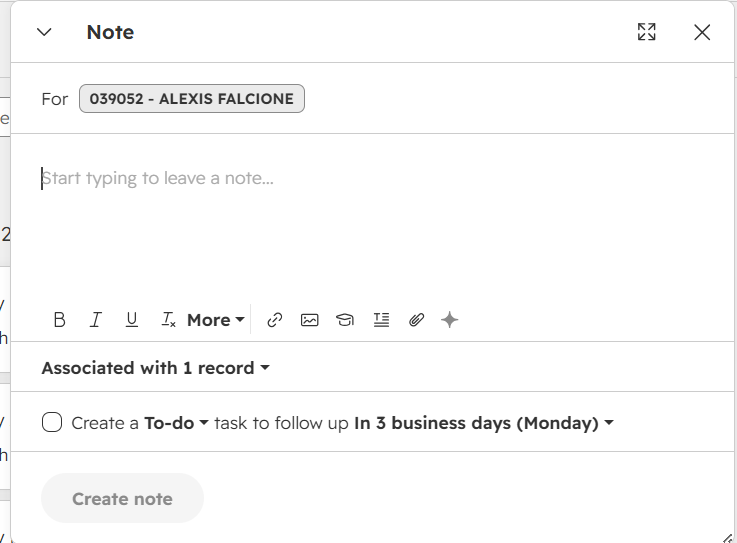
Create a Note in HubSpot
Salespeople utilize notes to capture essential details, provide context for their team, and monitor follow-up actions, fostering consistent engagement and enhancing collaboration.
Step 1 — Enter your note.
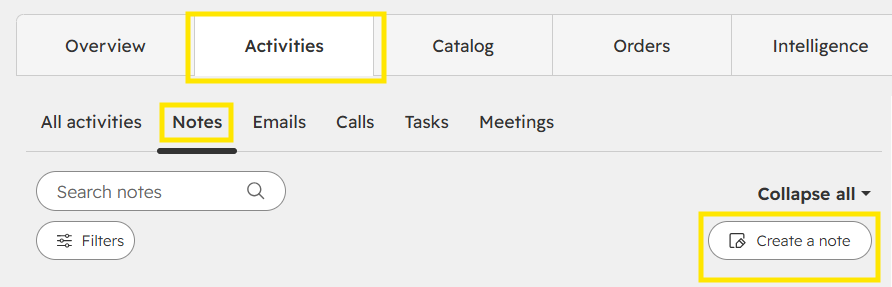
Go to Activities within the company record. Click on Notes and Create a Note. Your name will auto populate in the For field.
Insert your note message.
Text format options are available.
Step 2 — Confirm the associated record.
The record is the company or customer account associated with the note.
Step 3 — Add a task and follow-up date if needed.
Tasks and follow-up dates can be associated with notes.
Step 4 — Create the note.
Click Create note to create the note.