
Inside an AQ project's freight tab, users can calculate freight costs automatically through a variety of carriers. To obtain freight costs (get a quote), each item on the project must have four values defined:
- Ship To Address (zip code)
- Ship From Address (zip code)
- Weight
- Freight Class
AutoQuotes does provide a free freight generic account listed under "Kuehne+Nagel LTL eCommerce" that will produce a generic estimate of freight cost. However, since we have an account w/ Kuehne + Nagel, your login credentials are displayed below. Do NOT USE the generic account. Be sure to login as noted here.
Obtaining a Freight Quote- From within a project Spreadsheet, click on the Freight tab.
.png?width=670&height=333&name=AQ_Automatic_Freight_Freight_Tab(1).png)
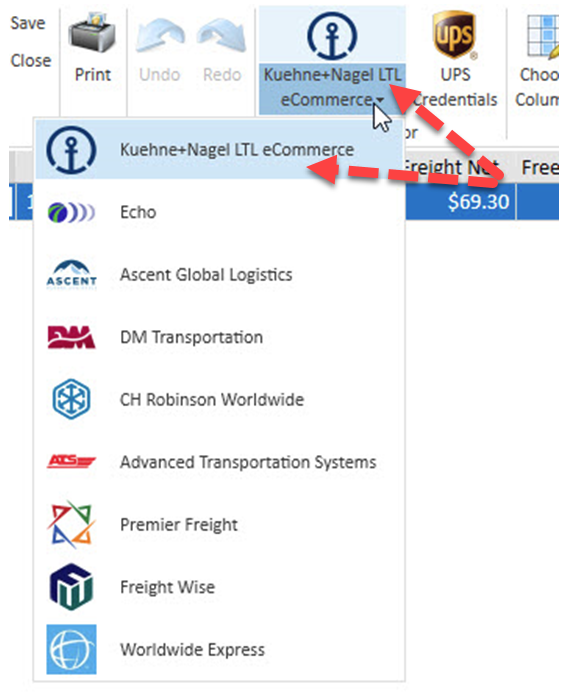
- Select Kuehne + Nagel LTL from the drop-down list located in the top ribbon of the Freight window (Located directly left of the UPS Credentials button).
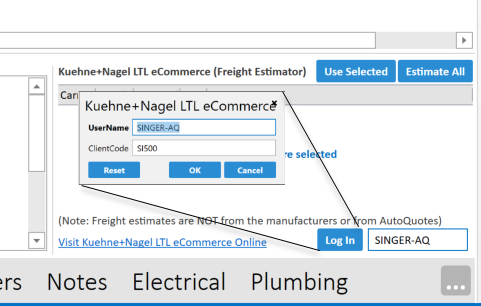
- Log in to Kuehne + Nagel using the Singer account credentials shown here (The Log In button is inside of the Freight Estimator, located on the right side of the bottom panel). Do not share this outside of the Singer Division as, for now, some other Singer divisions have unique login credentials.
- To obtain freight estimates one manufacturer at a time, click on a row within the Mfr list to highlight it. a. Select any Accessorial Charges required for the shipment. b. Here you can select any carrier offered for that manufacturer. Click “Use Selected” to use the selected carrier for that manufacturer in your estimate (or double-click the carrier).
- If you’d rather obtain freight estimates for all manufacturers at once, instead click “Estimate All,” on the right side of the freight estimator.
Note: This will automatically select the least expensive carrier for each manufacturer. You cannot select carriers using this method.
Note: Weights for associated items, e.g., Same Mfr, Ship To, Ship From & Freight Class, are combined.

Please be sure you are properly logged into Kuehne + Nagel in AQ and use it to estimate your inbound freight costs!