
Using SubHeaders and SubTotals are excellent ways to break out a project or a quote into sections.
Note: Both SubHeaders and SubTotals honor the insertion point settings found in the ribbon at the top of the project spreadsheet. These settings include:
- Insert Above Current Line
- Insert Below Current Line
- Insert As Last Item
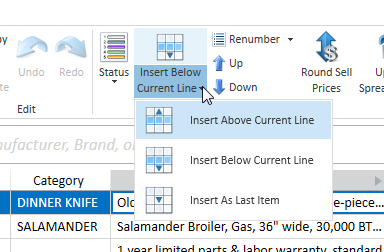
- Navigate to a Project Spreadsheet.
- Right-click on the row where the insertion should take place and select either option from the pop-up menu.

3a. After inserting a SubHeader into the spreadsheet, double-click on the row's Spec cell to change the text. Press the OK button to save.

3b. Add a SubTotal under each SubHeader section to show the subtotal for that part of the printed quote. In the image below, the SubTotal is under the "Kitchen" SubHeader.

- As shown below, SubHeaders and SubTotals appear as distinct sections within the published quote.

Watch the Video
AQ Basic Training Chapter 10 — Project Navigation & Toolbars