Skip to content
English
  • There are no suggestions because the search field is empty.

How Do I View the Order Log in Prelude?

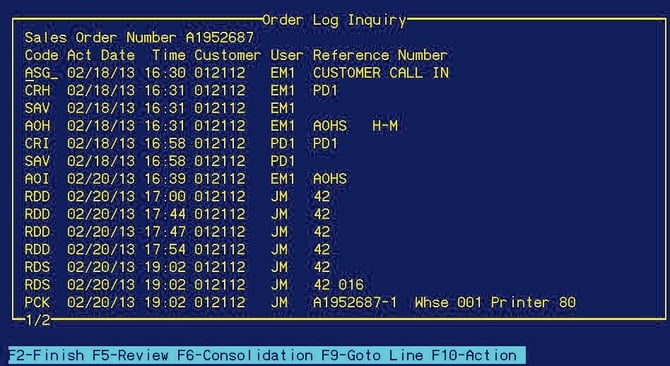
Use Order Log Inquiry to view the step-by-step path a sales order has taken and the users who have affected the order.

Job Aid: Order Log Inquiry 

Order Log Inquiry

Order Log Inquiry will show step by step the path a sales order has taken. Any user that has affected this order will show in the log. Slash command /OLI.

Step 1 — /OLI

While in sales order (/SOI) F8 to view the log.

While in sales order history (/SOHI), F7 to view.

Image_1_Prelude_Order_Log_Inquiry_Screen

Step 2 — Enter Sales order number, enter.

Image_2_Prelude_Order_Log_Sales_Order_Number

Image_3_Prelude_Order_Log_Results